Founding access · $39 once · perpetual licence
Shortlist from the fonts you already own.
Cormorant Garamond demo · naming this headline
Reads the fonts on your machine, previews them in your own words, and keeps a shortlist that remembers why you picked each face. Founding access adds the extension that names the font on any page.
Issue 12 · Letterforms
The quiet return of the wedge serif
Somewhere between a slab and a bracketed serif sits a shape that signage never stopped using and editorial pages are rediscovering.
The wedge is the serif you draw when you have a chisel, not a pen. It wants a flat foot and a firm shoulder, which is why it survives at small sizes on a station wall and why it reads as sturdy rather than fussy when the point size climbs. Most of the faces now doing the work were cut for a very different job.
“A serif that was built to be read from across a platform.”
What $39 buys
Seven things, each beside its free-plan version.
One payment, a perpetual licence, every update while it’s in beta. Every paid lock is shown before the work, never sprung after it.
-
01
The Chrome extension
Point at any text, or select it, and it names the family actually rendering — not the CSS stack — with weight, size, line-height, tracking and the webfont’s URL. Copy the CSS or send it to Typecase.
Free plannot includedNeeds sign-in with the purchase email.Foundingincluded -
02
Inspect a URL
Paste an address, see what families a site declares. Weaker than the extension by construction: no JavaScript is run, and the answer says so.
Free plannot includedFoundingincluded -
03
Export a Board
As Markdown or PDF a client can read.
Free planLocked, and shown locked before you start.Foundingincluded -
04
Boards
The per-project shortlist that remembers why.
Free plan1 live Board; archiving frees the slot.FoundingUnlimited -
05
Free alternatives
Ranked against any font you own, with the difference spelled out in words.
Free planThe top 3.FoundingThe full ranked list. -
06
Online catalogue search
About 1,600 open-licence families, searchable by name, category and measured character: x-height, width, contrast. Previewed in your own words.
Free planThe first 3 results of any search.FoundingEvery result. -
07
Saved references
Keep as many as you like.
Free plan10FoundingUnlimited -
All seven
$39
once · perpetual · every update in beta
The extension · part of founding access
What the badge says, and how it gets onto your machine.
Chrome and Edge. It reads type on a page, never type in an image — Typecase does not identify fonts from screenshots, and that is deliberate.
- The family actually rendering the text, not the stack the page declared.
- Weight, size, line-height, tracking, and whether it’s a webfont or a face installed on your machine.
- The webfont’s file URL, when it is one.
- Copy the CSS, or send it to Typecase. Sending opens app.typecase.dev carrying font metadata only, never font file bytes.
- Always on, if you want it, per site or everywhere: a grant you make in the popup and can take back there.
Alt+Shift+D point at text · Alt+Shift+F read a selection
Not on the Chrome Web Store yet.
The listing hasn’t been submitted, so you download it and load it unpacked: unzip, turn on Developer mode at chrome://extensions, Load unpacked, then sign in with the address you bought with. About a minute, and the download page walks through it.
Rather wait for the one-click version? Leave your email and I’ll write when the listing is live.
What it asks for
- activeTabThe page you invoke it on.
- scriptingTo draw the badge on that page.
- storageTo remember the sign-in.
- host accessNone at install. Optional, granted by you per site or everywhere for always-on, revocable in the popup.
What it touches
- sendsNothing about a page, except the font metadata you send by clicking.
- networkapp.typecase.dev only: the sign-in code, and a check at most every six hours.
- analyticsNone.
- storageOne token and the email, never given to a content script.
The app
The Shelf reads your fonts. The Board keeps the decision.
Runs in the browser at app.typecase.dev. Nothing to install, free to look around, and the font files never leave the machine.
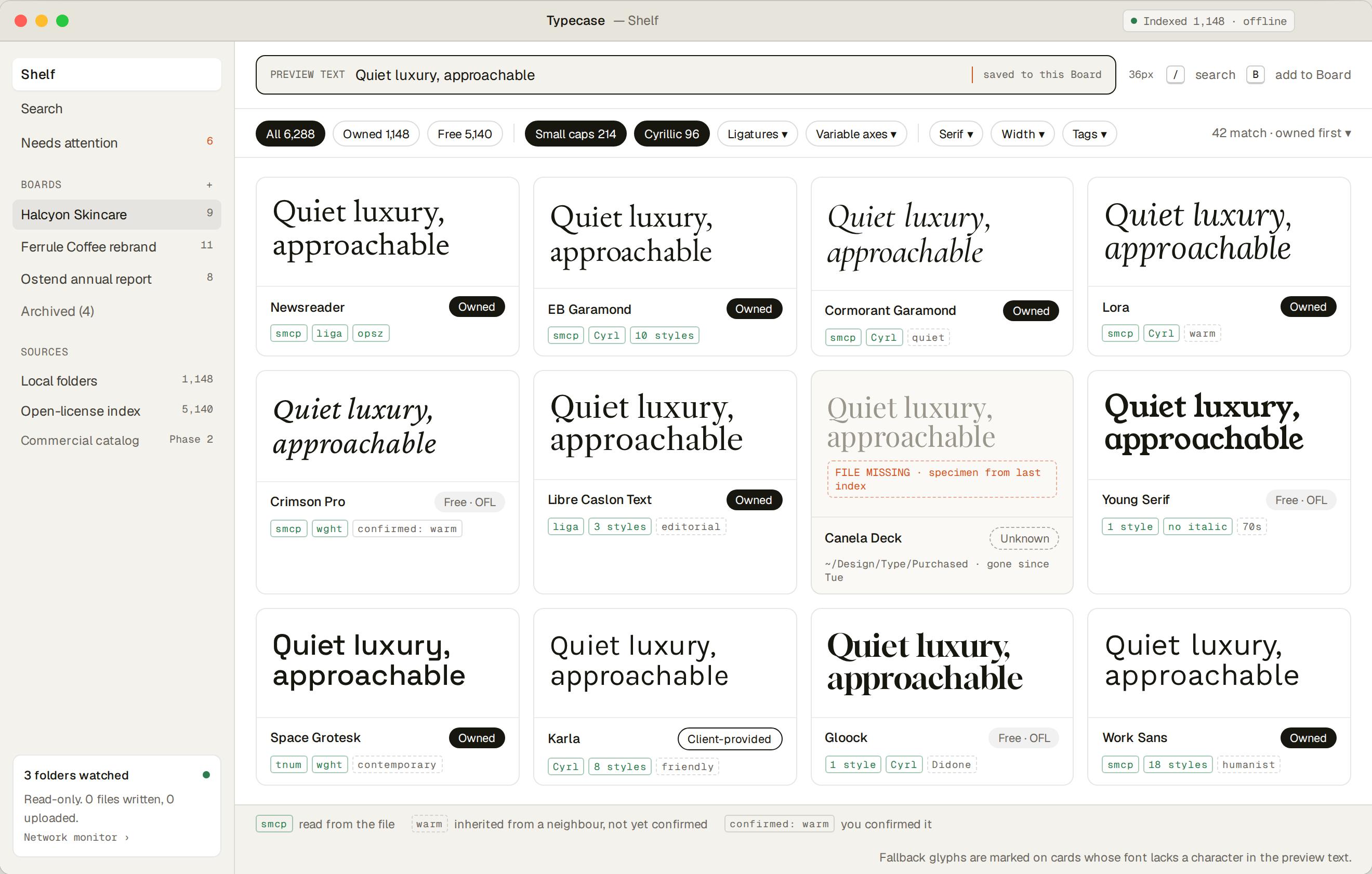
01 · The Shelf
Every font you own, in your own words.
Give permission once and it reads the fonts installed on your machine, or any folder you point it at. Type the client’s headline and every font re-renders in those words. Filters are what a font can actually do, measured from the outlines.
Indexed in the browser. The files never leave the machine.
Open the Shelf → Free.
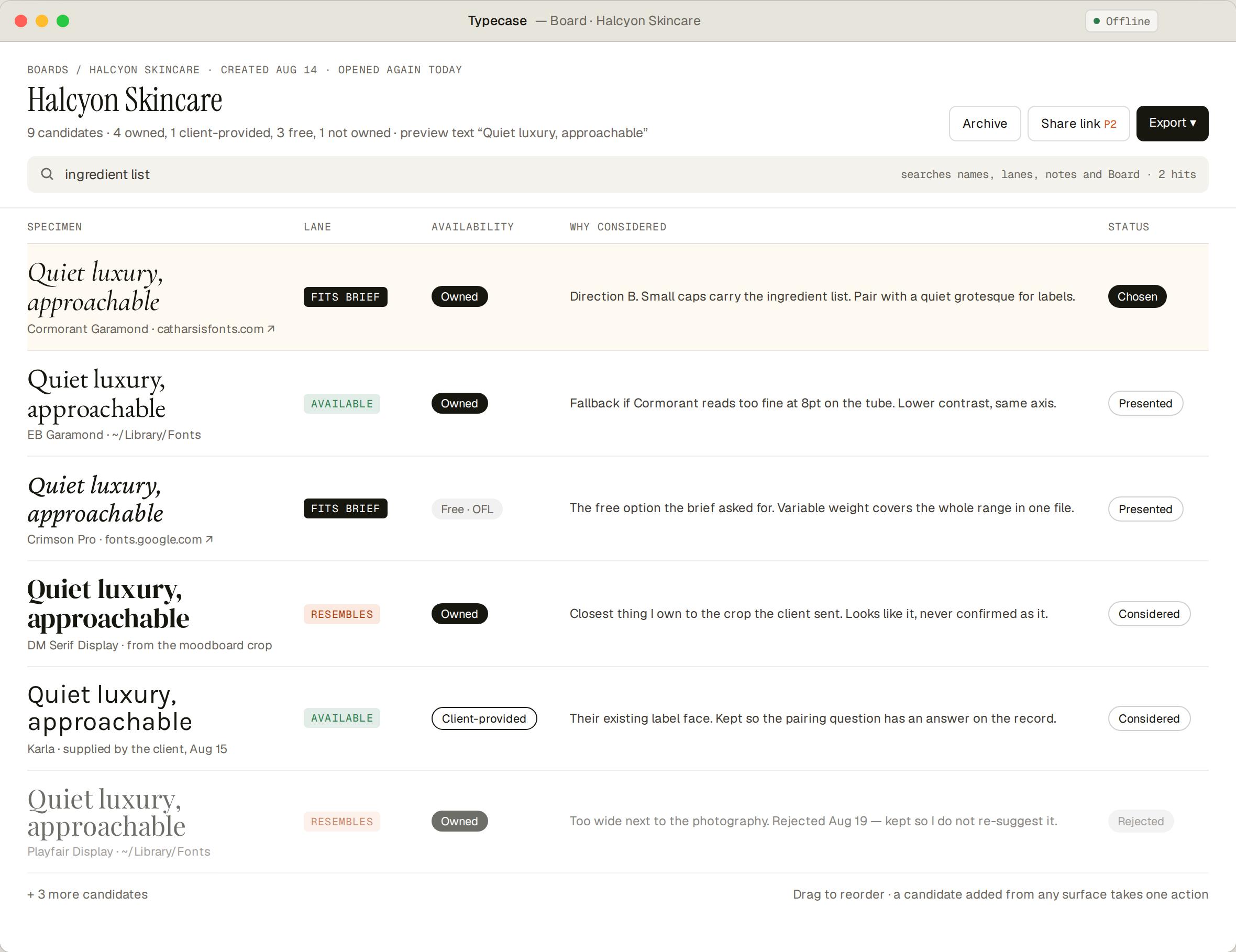
02 · The Board
The shortlist that remembers why.
A Board per project: the faces you’re weighing and the reason for each. Export it as Markdown or PDF a client can read.
Free: one live Board. Founding: unlimited, and export.
What it does download: open-licence webfonts from Google’s CDN, to preview families you don’t own, and the interface typefaces every page is set in. Nothing of yours is in those requests, and nothing of yours is uploaded, ever.
Search, in your own words
Pick a brief. Type your headline. Every specimen re-renders.
Free alternatives come back ranked, with the difference spelled out in words.
Look up a font: Helvetica · Gotham · Futura · Proxima Nova · Arial · all 1,953 profiles →
What the same jobs cost elsewhere
So $39 has something to stand next to.
Typecase doesn’t replace a font manager. Below are the tools that do one of its jobs, or sell what a free alternative stands in for, at the price each page printed on 5 September 2026.
| Tool | What its page says it does | Price, as printed | Read on 5 Sep 2026 |
|---|---|---|---|
| Fonts Ninja | Hover over any text to get the font name, styles, foundry and price. | Free | addons.mozilla.org |
| FontBase Awesome | A font manager; the paid tier adds tags and a search by contrast, proportion, x-height and weight. | $3 per month | fontba.se |
| RightFont | A font manager, single licence for one device. | $59.00 once, one device | rightfontapp.com |
| Google Fonts | The catalogue Typecase’s Online view searches: SIL OFL, some Apache 2. | Free | github.com/google/fonts |
| Adobe Fonts | More than 5,000 fonts free; over 30,000 with a subscription. | Subscription — price not read, not shown | fonts.adobe.com |
| MyFonts · Museo Sans | Buying one text family outright. | $89.00 USD, complete family of 10 fonts | myfonts.com |
| MyFonts · Neue Helvetica | Buying one large classic family outright. | $460.99 USD, complete family of 59 fonts | myfonts.com |
| Typecase, founding access | All seven items in the ledger above. | $39 once, perpetual | — |
Read from the pages linked, on the date shown. Prices move, and none of these is a like-for-like substitute; they are pointers, not quotes, and they are not added up into a “value”.
Pricing
Pay once. Keep it.
No subscription, no countdown, no seat count.
Enough to decide the tool is real: the whole Shelf and search across it, three free alternatives, three catalogue results, ten saved references, one Board. Item by item ↑
Open the appapp.typecase.dev
Perpetual licence, every update while it’s in beta. All seven: the extension, Inspect a URL, export, the full alternatives list, every catalogue result, unlimited Boards and references. Item by item ↑
FAQ
The things people ask first.
Is the extension on the Chrome Web Store?
Not yet — the listing hasn’t been submitted. You download it at typecase.dev/extension and load it unpacked with Developer mode on, which takes about a minute. Leave your email under Pricing and I’ll write when the listing is live.
Do my font files get uploaded?
No. Local font files never leave the machine; indexing happens in the browser. What it does download: open-licence webfonts from Google’s CDN when a view previews a family you don’t own, and the interface typefaces every page is set in. Don’t take my word for it — open the Network tab and watch. The privacy page has the rest.
What does the extension send?
Nothing about any page, except when you click Open in Typecase or Send all: those open app.typecase.dev carrying font metadata — family, stack, weight, style, size, line-height, letter-spacing, the webfont’s URL, and up to 120 characters of the text you selected. Never a font file. Its only other traffic is to app.typecase.dev, for the sign-in code and a check at most every six hours. No analytics.
Can it identify a font from a screenshot?
No. It reads type on a page, through the rendered page’s computed styles, never type in an image. That’s deliberate.
What’s free, and what’s the $39?
Free: the whole Shelf, search across it, the top three free alternatives for any font you own, the first three results of any online search, ten saved references, one live Board. The $39: the extension, Inspect a URL, export, the full ranked list of alternatives, every catalogue result, unlimited Boards and saved references. The extension needs a sign-in with the purchase email, so it can’t be tried first — the app is the free taste.
What happens after I pay?
Stripe takes the payment; card details never touch Typecase. A thank-you arrives from hello@typecase.dev, and you sign in to the app and the extension with the address you paid with: a six-digit code by email, no password. Change your mind within 14 days and replying to that email gets you a full refund.
Which browsers?
The extension: Chrome and Edge. The app works in current browsers; reading your installed fonts needs Chrome or Edge, and pointing it at a folder of font files works anywhere.
Seven things. $39, once.
The extension, the app with every limit lifted, every update while it’s in beta. Full refund within 14 days.
Built by one person, Mykola. hello@typecase.dev reaches him directly.